Bank statement layouts LedgerDrop is tested on
LedgerDrop does not look up your bank. It reads the layout of the PDF — where the dates, descriptions and amounts sit, and which way each amount points — so it is not limited to the banks below, and it can also get an unusual statement wrong. What is below is the set it is held to: 15 fictional statements, laid out like statements from the United States, Canada, Australia and Singapore, three published by another developer for testing parsers, and one in Spanish. A change that loses one row or gets one amount wrong on any of them does not ship.
The quickest way to know whether it reads yours is to try it. The converter shows the whole table and checks it against the balances the statement prints, free, on a statement of any length; nothing is uploaded. Each layout below is named by its type rather than by a bank, because a bank's name is its trademark and because the layout is what the converter actually reads.
How each layout is tested
Every statement has an answer file: each transaction's date, amount and sign. The test converts the PDF and fails on one missed row, one extra row, or one amount, date or sign that differs from the answer. It then converts the same statement again with each of these changes that applies to it — things a bank could equally print — and the answer has to stay the same: page numbers and footers with numbers in them, amounts grouped with spaces or with dots (1.234,56), a typographic minus or brackets for a negative amount, no balance column, a page break inside the table, the year printed only at the end of the period, and stray years elsewhere on the page. The pictures below are drawn for this page with a fictional bank and invented rows, in the layout described.
Jump to: United States · Canada · Australia · Singapore · third-party test statements · other languages
United States
US bank, checking: sections set the sign
- Country
- United States
- Account
- Personal checking
- Columns
- Date | Description | Amount, repeated under each section heading
- Dates
- MM/DD with no year; the statement period runs from December into January
- Signs
- No signs on the amounts. The section heading says which way the money went: deposits and additions, card withdrawals, electronic withdrawals, fees
- Totals
- A "Total …" line closes each section; a block of daily ending balances follows the transactions
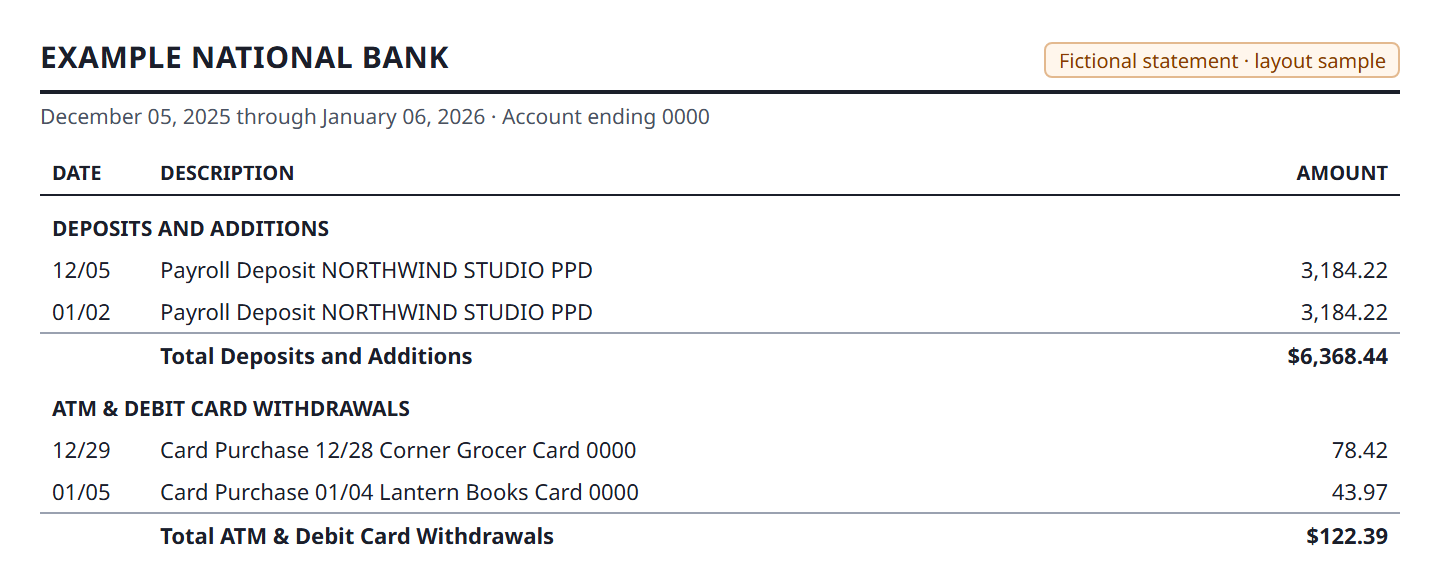
Checked, besides every row’s date, amount and sign:
- each row takes its sign from the section it sits under
- December rows get the earlier year and January rows the later one
- the section totals and the daily-balance block give no rows
US bank, checking: minus printed on withdrawals
- Country
- United States
- Account
- Personal checking
- Columns
- Date | Description | Amount, under section headings
- Dates
- MM/DD/YY, and the description starts with the same MM/DD again
- Signs
- Withdrawals carry a printed minus ("-176.44"); deposits have none
- Totals
- "Total deposits and other additions" and "Total withdrawals and other subtractions"; headings repeat with "- continued" after a page break
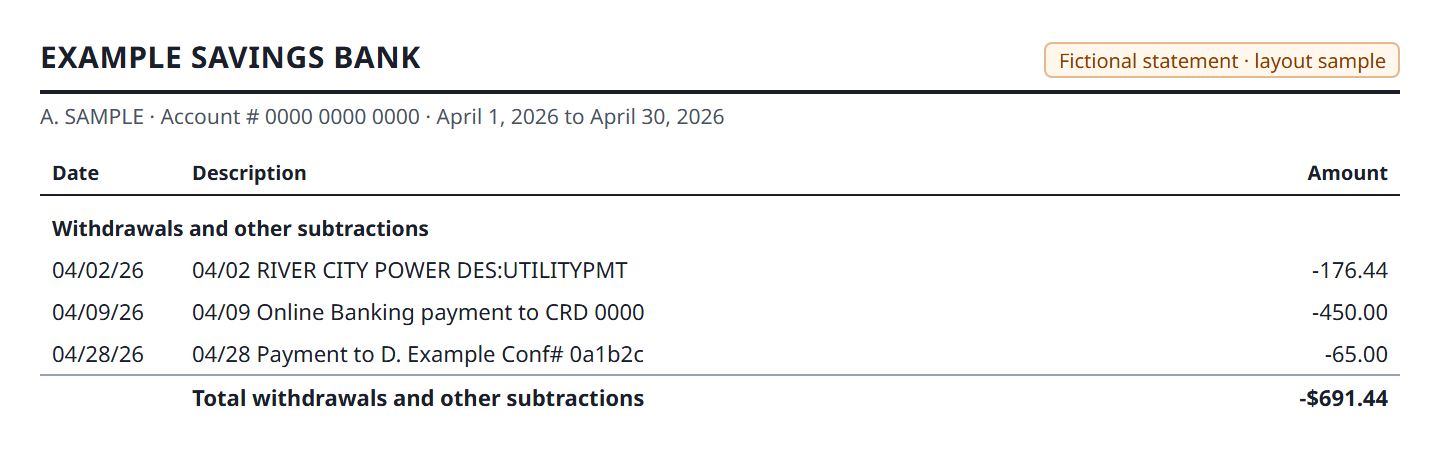
Checked, besides every row’s date, amount and sign:
- the MM/DD repeated at the start of a description is not taken for the row's date
- the printed minus is the sign
- the totals and the "- continued" headings give no rows
US bank, checking: deposits and withdrawals in two columns
- Country
- United States
- Account
- Personal checking
- Columns
- Date | Check Number | Description | Deposits/Credits | Withdrawals/Debits | Ending daily balance
- Dates
- M/D with no year
- Signs
- No signs; the column an amount sits in says which way it went
- Totals
- The balance is printed only on the last row of each day, so most balance cells are empty; an ending balance and totals row at the end
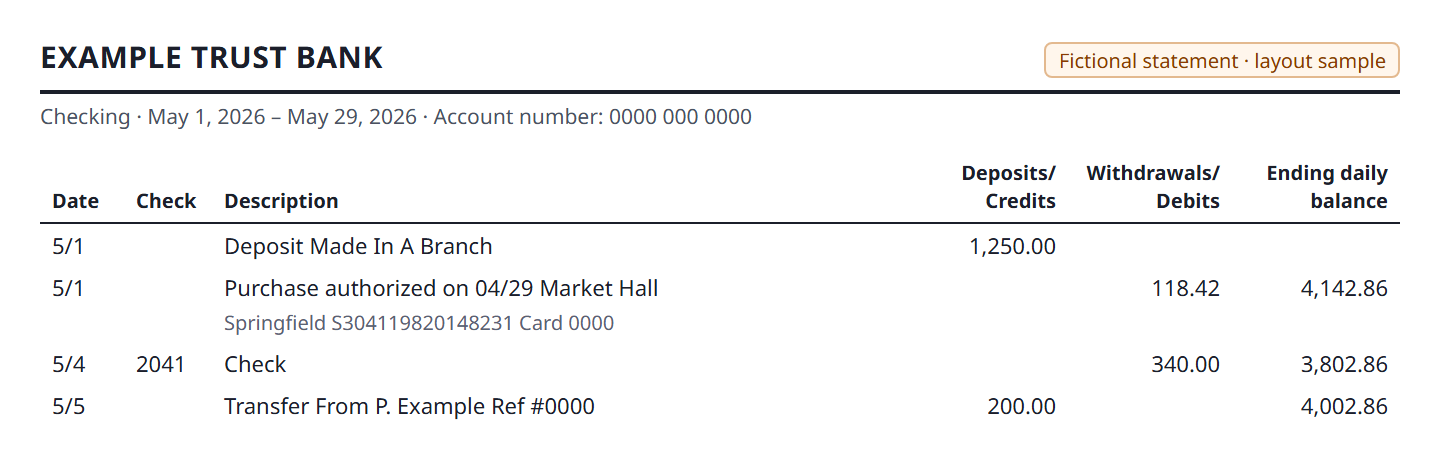
Checked, besides every row’s date, amount and sign:
- a cheque number in its own column is not taken for an amount
- an amount next to an empty balance cell keeps its column, and so its sign
- the totals row gives no row
US bank, checking: one signed amount and a balance
- Country
- United States
- Account
- Personal checking
- Columns
- Date | Description | Amount | Balance
- Dates
- Month name, day and year ("Feb 3, 2026")
- Signs
- One amount column, with "-$" on money going out and "$" on money coming in
- Totals
- None in the table; an account summary above it; "Transactions (continued)" on the next page
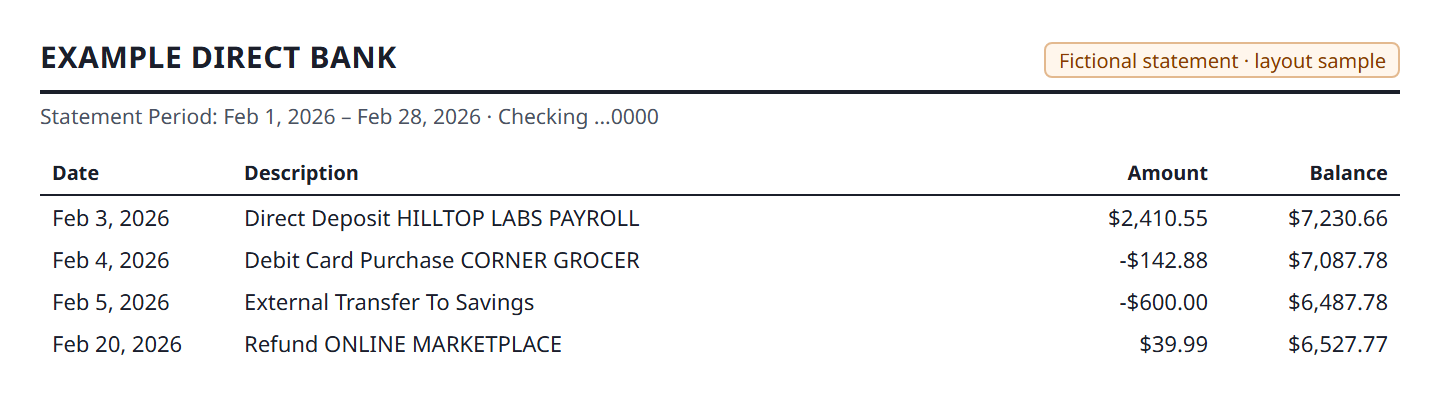
Checked, besides every row’s date, amount and sign:
- dates written with the month's name
- the "-$" sign
US credit card: charges and payments, no balance column
- Country
- United States
- Account
- Credit card
- Columns
- Date | Description | Amount, under "Payments and Credits" and "New Charges"
- Dates
- MM/DD/YY
- Signs
- Printed from the card's side: payments and refunds as "-$", charges as "$". LedgerDrop turns them round so that money leaving you is negative
- Totals
- A total under each section; no running balance, only the previous and new balance in the summary
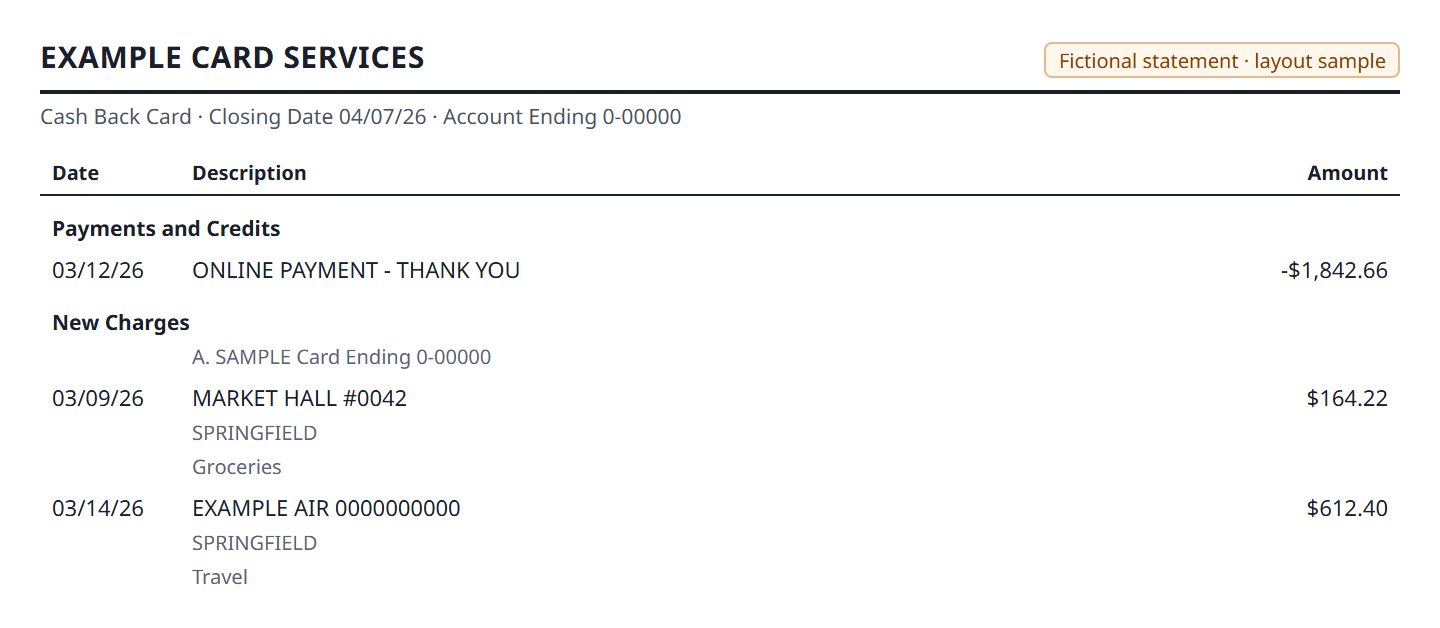
Checked, besides every row’s date, amount and sign:
- the card's signs are reversed, so a charge comes out negative and a payment positive
- the two detail lines under each charge and the cardholder line give no rows
Canada
Canadian bank, personal chequing
- Country
- Canada
- Account
- Personal chequing
- Columns
- Date | Description | Withdrawals ($) | Deposits ($) | Balance ($)
- Dates
- D Mon ("15 Mar"), with no year, printed on the first row of a day only
- Signs
- No signs; separate withdrawal and deposit columns. An amount under a dollar can be written ".15"
- Totals
- An "Opening balance" row with no date; the balance printed on the last row of a day only; a summary with "+", "-" and "=" before the amounts
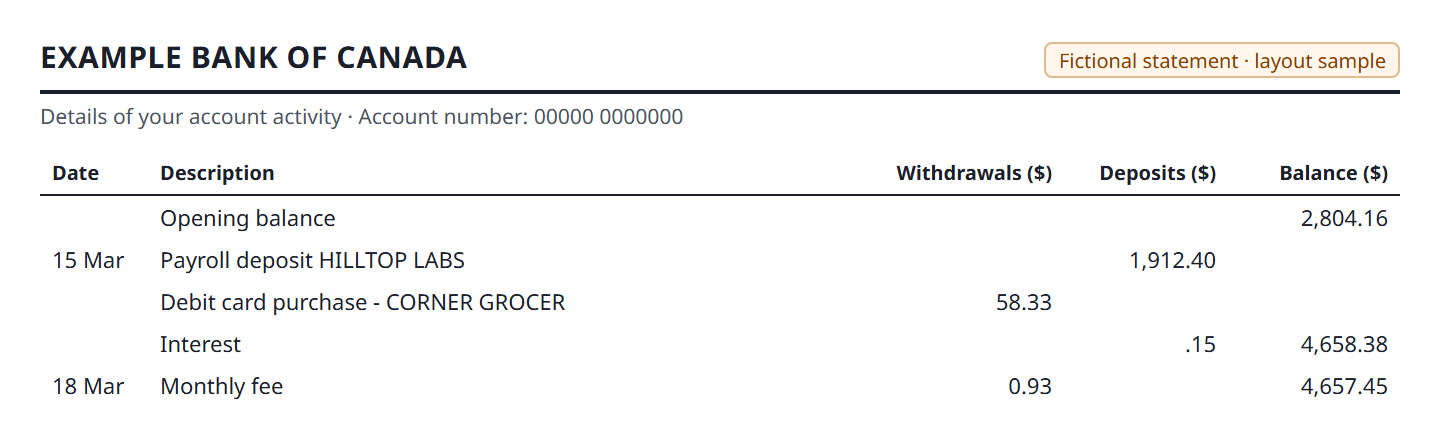
Checked, besides every row’s date, amount and sign:
- a row without a date takes the date of the row above
- an amount written ".15" is read as 0.15
- the opening balance row is not a transaction
Canadian bank, credit card with a side panel
- Country
- Canada
- Account
- Credit card
- Columns
- DATE | ACTIVITY DESCRIPTION | AMOUNT ($), with a panel of rewards, payment and interest figures on the same lines to the right
- Dates
- D-Mon ("10-Jul"), one date per row; the year only in "STATEMENT FROM … TO …"
- Signs
- "$" on every amount; a payment or credit is negative, per the bank's guide to reading the statement
- Totals
- "PREVIOUS STATEMENT BALANCE" as the first line of the table and "NEW BALANCE" as the last; an interest rate chart below
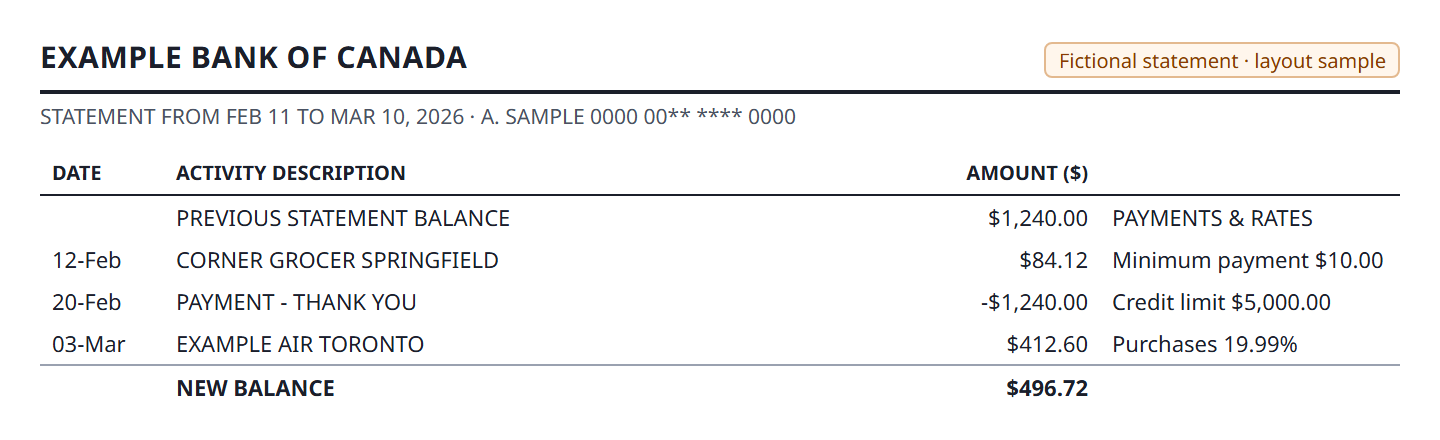
Checked, besides every row’s date, amount and sign:
- the figures in the side panel are not read as amounts
- the year taken from the statement period
- a payment comes out positive and a purchase negative
- the previous and new balance lines give no rows
Australia
Australian bank, personal transaction account
- Country
- Australia
- Account
- Personal transaction account
- Columns
- Date | Transaction Details | Withdrawals ($) | Deposits ($) | Balance ($)
- Dates
- DD MON in capitals ("05 AUG") with the year on a line of its own above the opening row
- Signs
- No signs; withdrawals and deposits in separate columns, a balance on every row
- Totals
- "TOTALS AT END OF PAGE" and "TOTALS AT END OF PERIOD", written with "$"; a summary box on the first page
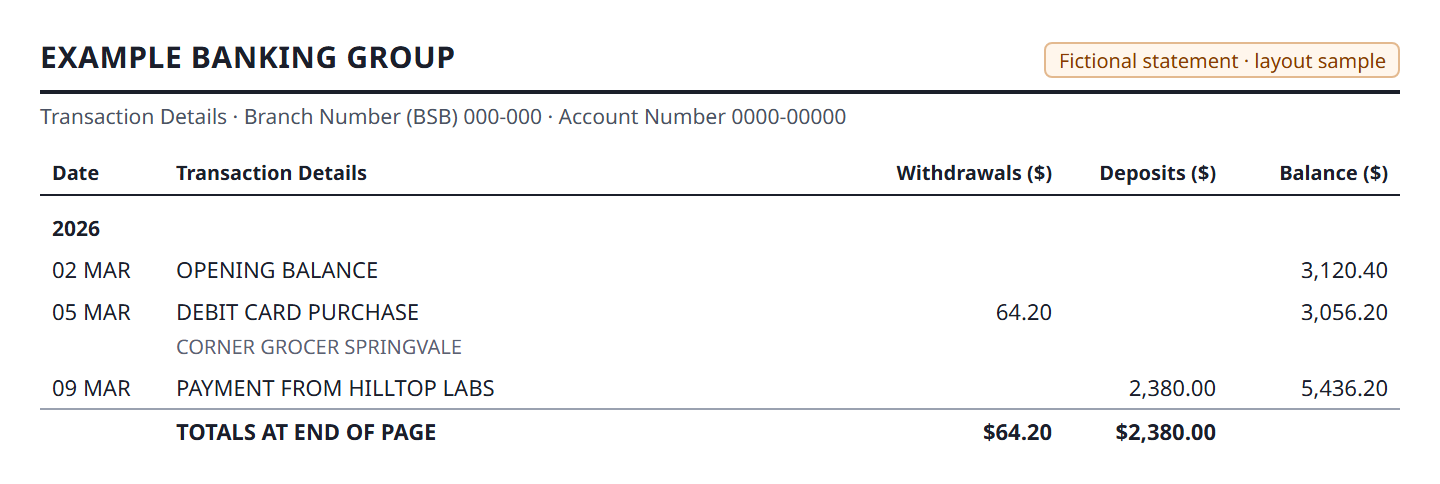
Checked, besides every row’s date, amount and sign:
- the year taken from its own line above the table
- neither totals line gives a row
Australian bank, business transaction account
- Country
- Australia
- Account
- Business transaction account
- Columns
- Date | Transaction Details | Withdrawals ($) | Deposits ($) | Balance ($)
- Dates
- DD MON, the year on its own line above the opening row
- Signs
- No signs; separate withdrawal and deposit columns, a balance on every row
- Totals
- The same "TOTALS AT END OF PAGE / PERIOD" lines as the personal account; the summary is in title case ("Opening Balance:")
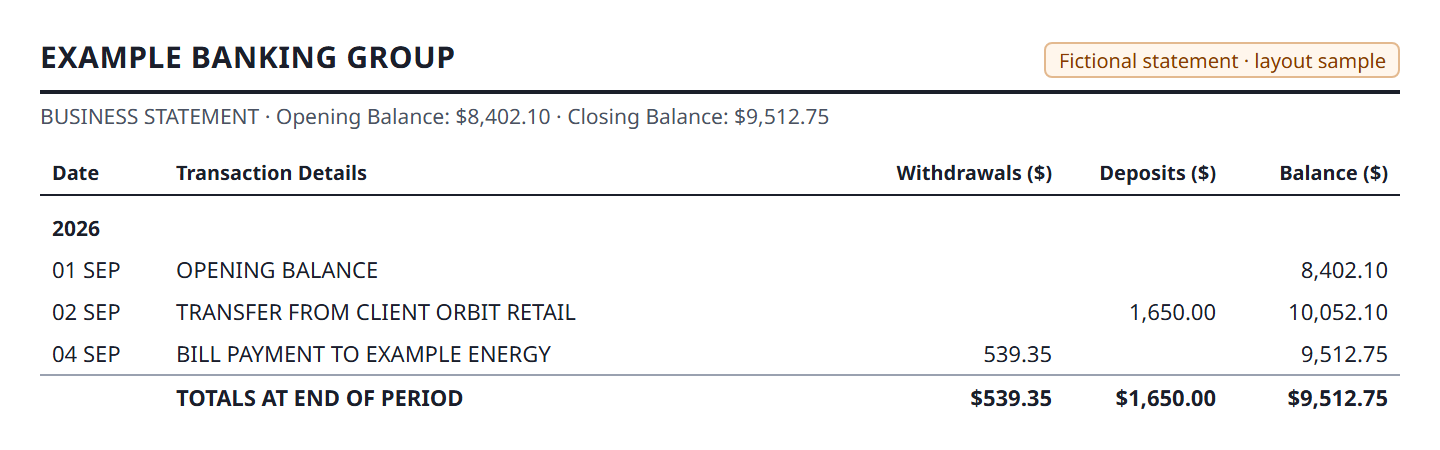
Checked, besides every row’s date, amount and sign:
- the year line above the opening row
- the title-case summary and both totals lines give no rows
Australian bank, business card with GST columns
- Country
- Australia
- Account
- Business card facility
- Columns
- Date | Description | Amount | Default GST* | Actual GST, one table per cardholder
- Dates
- DD/MM/YYYY on every row
- Signs
- Every row in the sample is a purchase or interest, printed without a sign
- Totals
- "Sub-total" after each cardholder's group, the headings again for the next group, and the closing account balance outside the table
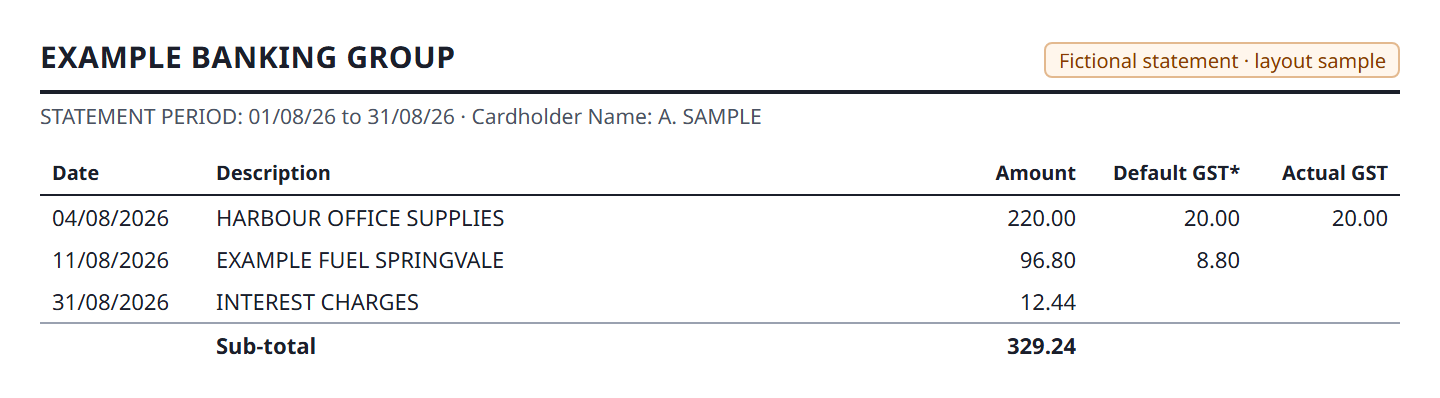
Checked, besides every row’s date, amount and sign:
- the GST figure beside an amount is not taken for the amount
- the sub-totals give no rows
- the rows under the second set of headings are read as well as the first
Singapore
Singapore bank, consolidated statement
- Country
- Singapore
- Account
- Deposit account inside a consolidated statement
- Columns
- Date | Description | Withdrawal (-) | Deposit (+) | Balance (SGD)
- Dates
- DD/MM/YYYY on every row
- Signs
- No signs in the table; withdrawal and deposit columns. In the account summary an overdrawn balance is written with the minus after it ("5,100.00-")
- Totals
- "Balance Brought Forward" with no date, "Total Balance Carried Forward" with both totals, and interest messages under the table that are not rows
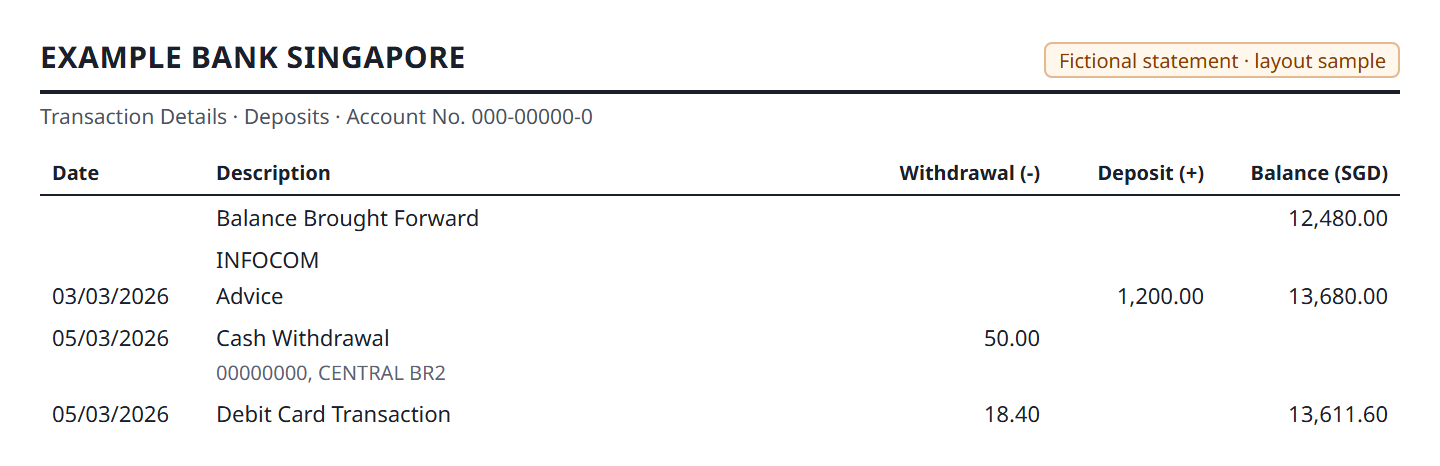
Checked, besides every row’s date, amount and sign:
- a description line printed above the date line gives no row of its own
- a row with no balance is still read
- the brought-forward and carried-forward lines and the interest messages give no rows
Third-party test statements
Rupee checking statement, reference lines under each row
- Country
- India-style (INR), third-party test statement
- Account
- Checking
- Columns
- DATE | DESCRIPTION | DEPOSIT | WITHDRAWAL | BALANCE
- Dates
- DD-MM-YYYY on every row
- Signs
- No signs; deposit and withdrawal columns, and "CR" printed with the balance
- Totals
- Opening and closing balance in a banner above the table; no total lines
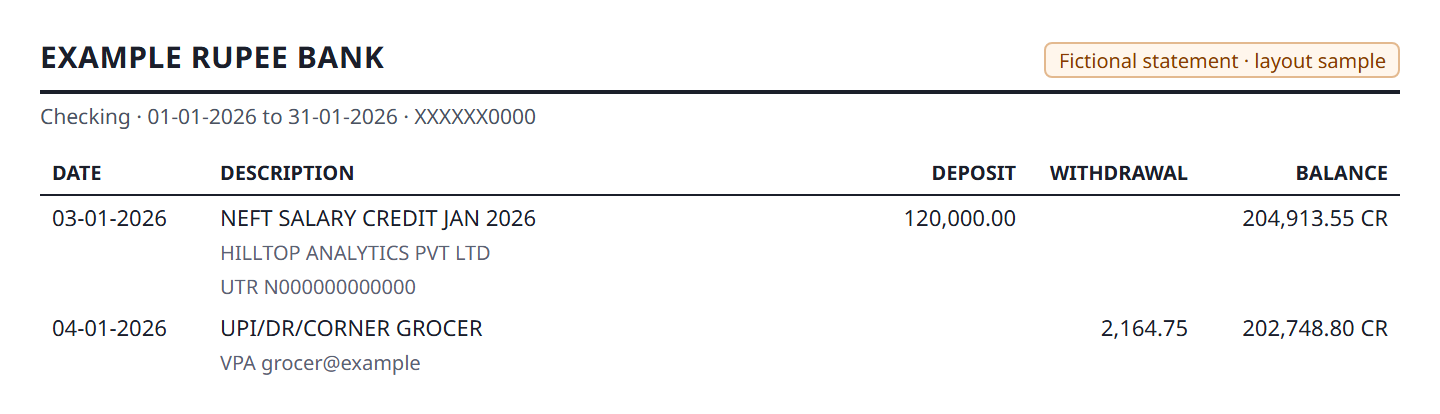
Checked, besides every row’s date, amount and sign:
- the reference lines under each row and the "CR" by the balance give no rows or amounts
Rupee salary account, description above the date
- Country
- India-style (INR), third-party test statement
- Account
- Salary savings account
- Columns
- DATE | DESCRIPTION | DEPOSIT | WITHDRAWAL | BALANCE
- Dates
- DD-MM-YYYY, printed on the second line of each entry: the first line of the description sits above it
- Signs
- No signs; deposit and withdrawal columns
- Totals
- No totals; the account banner is printed again on the next page with "CONTINUED"
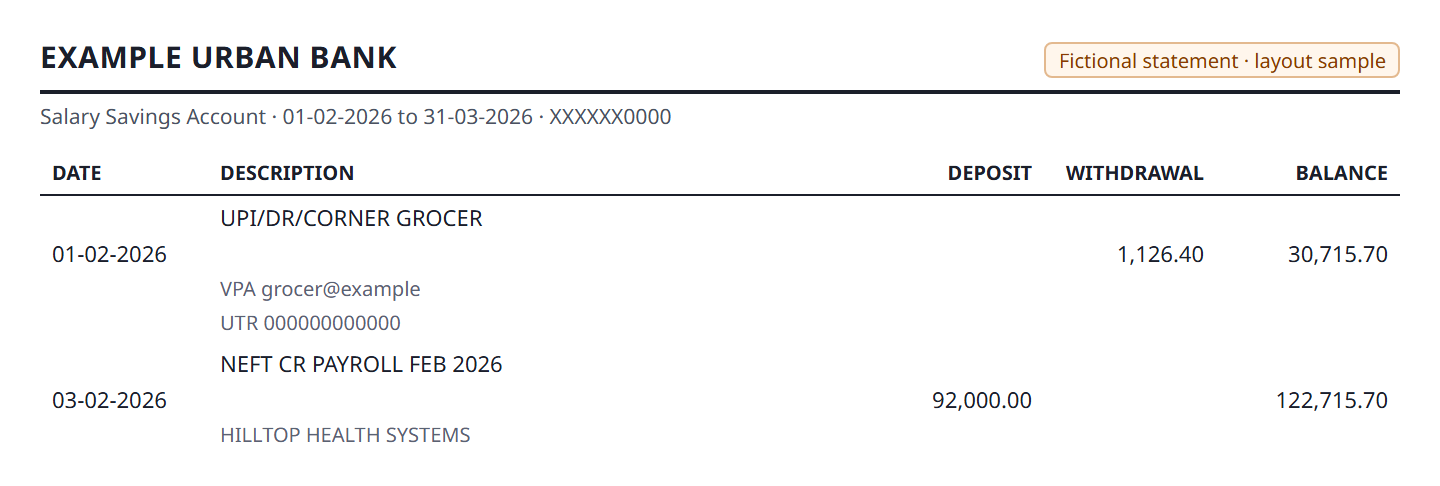
Checked, besides every row’s date, amount and sign:
- a description line above the date line gives no row of its own
- the banner repeated on the second page gives no rows
Rupee business current account over three months
- Country
- India-style (INR), third-party test statement
- Account
- Business current account
- Columns
- DATE | DESCRIPTION | DEPOSIT | WITHDRAWAL | BALANCE
- Dates
- DD-MM-YYYY on the first line of each entry; the period spans March to May
- Signs
- No signs; deposit and withdrawal columns
- Totals
- No totals; the opening and closing balance banner repeats on each page
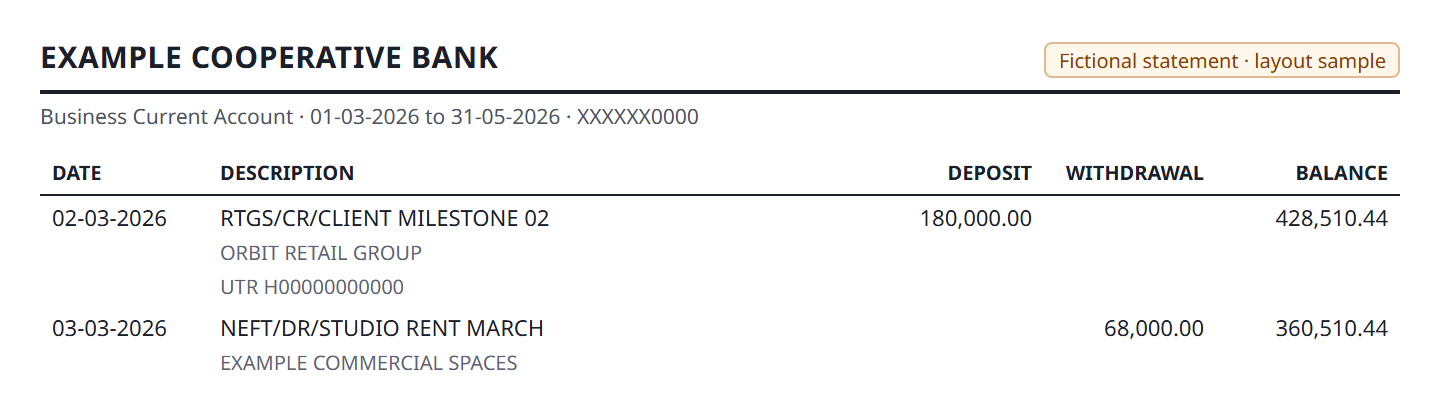
Checked, besides every row’s date, amount and sign:
- every row over three pages, with the account banner on each, read as one statement
Other languages
Spanish-language current account: you name the columns
- Country
- Spanish-language statement
- Account
- Current account (cuenta corriente)
- Columns
- Fecha | Concepto | Importe | Saldo
- Dates
- DD/MM/YYYY
- Signs
- One signed amount column ("-128.44"), a balance on every row
- Totals
- Opening and closing balance (Saldo inicial, Saldo final) above the table
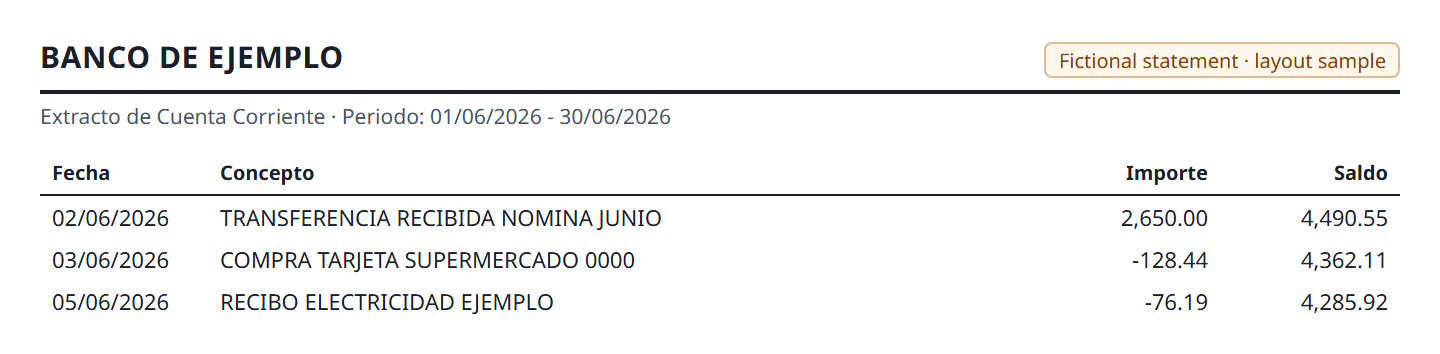
Checked, besides every row’s date, amount and sign:
- nothing is guessed: the headings are not ones LedgerDrop knows, so it finds no rows until you say which column is the date, the description, the amount and the balance
- once named, every row comes out
Try your own statement → The table and the balance check are free at any length, and the PDF stays in your browser.
What it does not read
A scanned statement: a picture of a page has no text in it, and LedgerDrop does not do OCR. Is your bank statement PDF scanned or text? shows three ways to tell. A statement whose headings are in a language it does not know comes out empty until you name the columns, as the Spanish one above does. And a layout unlike any of these can be misread; the balance check is there to say so when it happens, and how to check a converted CSV for errors covers what to do next.
Questions
Does LedgerDrop support my bank?
Probably, if your bank's statement is a text PDF with one row per transaction — but LedgerDrop has no list of banks to check against, because it never reads the bank's name. It finds the table by its layout. The layouts on this page are the ones it is tested on; a statement laid out like one of them is the likeliest to convert cleanly. Converting yours shows the full table and the balance check free, so you can see the answer before deciding anything.
My bank's layout is not on this list. Will it work?
It may well. The test set covers the things that vary between banks — one signed amount column or separate debit and credit columns, dates with or without a year, a running balance or none, totals and section headings inside the table — rather than particular banks. If the result is wrong, the balance check will usually not reconcile, and the column controls in the converter let you say which column is which.
Can I convert a bank statement to CSV from my country?
The tested layouts come from the United States, Canada, Australia and Singapore, with a set of rupee statements made by another developer and one in Spanish. Amounts in other currencies are read the same way; LedgerDrop writes the numbers and does not convert currency. Dates written day first (31/08/2026) and month first (08/31/26) are both in the set.
Does it read credit card statements?
Yes; three of the layouts are cards. A card statement prints charges as positive and payments as negative, the reverse of a bank account, and LedgerDrop turns them round so that in the CSV money leaving you is negative, the same as on a current account.
What if the column headings are in another language?
LedgerDrop recognises the headings it knows, which are English. On a statement headed Fecha, Concepto, Importe and Saldo it finds no columns at all rather than guessing. You then pick which column is the date, the description, the amount and the balance in the converter, and every row comes out. Naming the columns is free.
More on getting the CSV right: should debits be negative in a bank CSV?, why a converted CSV shows the wrong year, and all the guides.