How far back can you download bank transactions as CSV?
Published 21 September 2026 · by Tekiba
Anywhere from 90 days to seven years, depending on the bank: Wells Fargo puts the download at 90 days by default and up to 18 months for some accounts, Chase's Spending Planner describes two years, and NatWest says seven. If the month you need is older than your bank's download window, look in the statement archive instead. That archive is a separate list and usually a longer one — six or seven years for the main accounts below, less for some products. So at most banks there is a stretch of months with no download button left but a statement PDF still on file, and converting it is how they reach a spreadsheet. LedgerDrop does that in your browser, and the file never leaves it.
What five banks say
Every figure below was read off the banks' own help pages in September 2026, and each row links back. Where a page gives no number, the row says so.
| Bank | Transaction download | Statements online |
|---|---|---|
| Wells Fargo activitystatements | “The last 90 days of transactions” by default, and up to 18 months “for certain types of accounts”. Comma-delimited or Quicken Web Connect. | Up to 7 years for deposit, mortgage and trust accounts; 2 years for credit cards and personal loans; 12 months for auto loans. |
| Chase Spending Plannerstatements | Of the Spending Planner: “for the last two years” on a desktop, as CSV, QFX, QIF or QBO; on a phone, PDF for the last calendar year. | “Depending on your account type you can access up to 7 years of statements.” |
| Barclays statements | Not given on the help page. | “Up to 7 years, as long as the account is still open.” Up to 5 years for a closed account, if you still bank with them. |
| HSBC UK midatastatements | No general figure. The midata export — a fixed format, not a range you pick — covers “the 12 month period ending 30 days ago”. | “You can view old statements up to 6 years back in online or mobile banking.” |
| NatWest activitystatements | “Going back 7 years … provided of course that your account has been open throughout that period.” Excel and PDF are the formats named. | “You can download, save and print the last 7 years of statements within Online Banking.” |
As of September 2026. Products differ within one bank.
Why the two are not the same length
None of the pages says why, so this is an observation about how the two behave rather than a reason a bank has given. A download is generated on demand from the activity screen: you choose a date range, and the file is built from the activity the bank is showing you, so it inherits that screen's window. A statement is the opposite: a document produced once a cycle, fixed on the day it was issued, and filed. One is a view; the other an archive, which at most banks reaches further back.
It also explains what the table shows: more banks publish a figure for the archive than for the download. One is a promise about documents; the other a property of a screen.
Getting an older month into a CSV
-
Take the statement, not the activity export. The statements sit under a heading of their own — “Statements and documents”, or similar — away from the activity screen and its date picker, and at most banks they reach back further. What you get is a bank-generated PDF, the kind that holds real text; three ways to check whether a statement PDF is scanned or text settles that in a minute, and a scan cannot be converted at all.
-
Convert it. Drop the PDF into the converter. Age changes nothing: the page is read the same way whether it was issued last week or three years ago. Convert a bank statement to CSV without uploading it walks it through with screenshots.
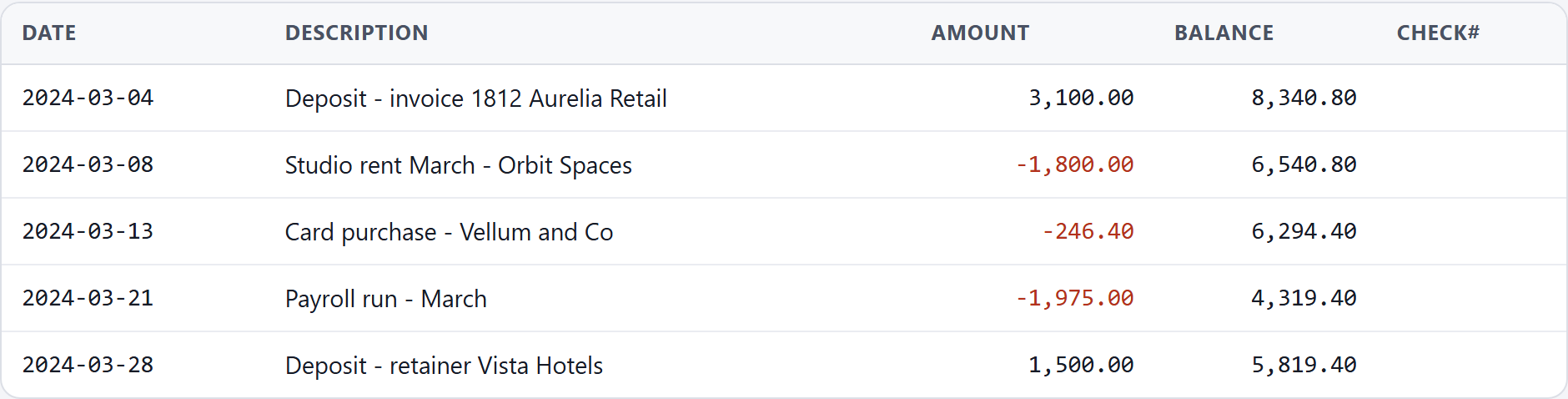
A statement for March 2024, older than the download windows Wells Fargo and Chase state above, converted in the browser. It is fictional, built by the script that takes this screenshot; no real statement is used anywhere on this site. -
Check the balances. The converter adds the transactions to the opening balance and compares the total with the closing balance printed. The check catches a dropped row or a misread amount — not two errors that cancel, and not a date read the wrong way round. Checking a converted bank statement CSV for errors covers what that sum catches — worth more on an old month, since there is no export to compare against.
Convert a statement → Free, no account, and the PDF stays in your browser.
What this does not fix
It cannot make a bank keep anything longer. If the archive has already run past the month you need, the request goes to the bank: NatWest tells customers needing statements older than seven years to contact it.
It does not read a scan. A statement somebody printed and scanned, or photographed, is a picture with no text in it, and LedgerDrop stops rather than guessing — it does not do OCR. Take the PDF from online banking instead.
And it does not add what the statement never carried: categories and tidied-up merchant names were never in the PDF, so they will not be in the CSV.
Questions
Why does my bank only show 90 days of transactions?
Because the activity screen is a window onto recent activity rather than the whole history, and the download takes its range from it. Wells Fargo is explicit — “By default, the download will capture the last 90 days of transactions” — and adds that for certain account types up to 18 months may be available once you choose the time frame. Other banks draw the line elsewhere: Chase's Spending Planner describes two years, NatWest seven. Whatever the number, it applies to the download; at most banks the statements reach further back, under a different heading.
Can I get transactions older than the statement archive?
Not by yourself, and not with a converter. Once a month has dropped off both the activity screen and the statements list, nothing in your browser can bring it back — the records are on the bank's side. Asking the bank is the route, and some say so themselves: NatWest tells customers needing statements older than seven years to contact it. Statements you have already saved stay yours whatever the archive later drops.
Is a PDF statement the same data as the CSV export?
Nearly, not identically. Both come from the same ledger, so the transactions match. The statement is cut to the bank's own cycle and fixed on the day it was issued, while an export is cut to the dates you picked and built today, so the two need not line up at the edges of a month. The difference that matters here is the running balance: where a statement prints one beside each row, that column is what lets a converted CSV be checked against itself.
For an account that is already closed: getting statements from a closed bank account (and converting them).
Next: convert a statement without uploading it, check the result for errors, why “PDF to Excel” makes bank statements messy, why Excel changes the dates in your bank CSV, is it safe to upload bank statements?, and merge 12 months of bank statements into one CSV.