Merge 12 months of bank statements into one CSV (without duplicates)
Published 28 September 2026 · by Tekiba
Convert each statement on its own and check it against its own balances; check that each statement closes where the next one opens; mark rows that match on date, amount and description, but do not delete them yet; and check that the year's transactions add up to the last closing balance minus the first opening balance. Avoid automatic de-duplication: two real payments of the same amount on the same day look exactly like one payment copied twice.
Where duplicates come from
A duplicate is a transaction in the merged file twice because two of your files cover the same day. Twelve monthly statements whose periods run back to back overlap nowhere; the risk comes from mixing sources: a statement next to a transaction download whose date range runs into it, two downloads with overlapping ranges, or one PDF saved twice under two names.
The opposite fault is a gap, such as a month missing. Nothing in the rows shows it; the balances and the periods in step 2 do.
Four steps
Convert each statement, and check each one against itself. A statement's transactions should add up from its opening balance to its closing one. In LedgerDrop the free version converts one statement at a time, with a CSV for files of up to three pages and the table and balance check for any length. LedgerDrop Pro takes the twelve PDFs at once and writes one CSV with a column naming the file each row came from, or a ZIP with one CSV per statement.

With several files the balance check counts statements — here “Balance check: all 3 add up” — and never adds one statement's balances to another's.
Check the chain by hand. List each statement's printed opening and closing balance in date order. Each closing balance should be the next opening balance, and each period should start the day after the last ended. A break marks a gap or an overlap between those two files. LedgerDrop does not compare one file with the next.
| Statement | Opening | Closing |
|---|---|---|
| January 2025 | 3,120.00 | 3,250.35 |
| February 2025 | 3,250.35 | 3,487.55 |
| March 2025 | 3,487.55 | 3,581.50 |
Flag duplicate candidates; do not delete them. Sort the merged file by amount, then date, and look for neighbouring rows that match on date, amount and description. Put a mark beside each pair rather than removing one. Then decide each pair with the PDFs:
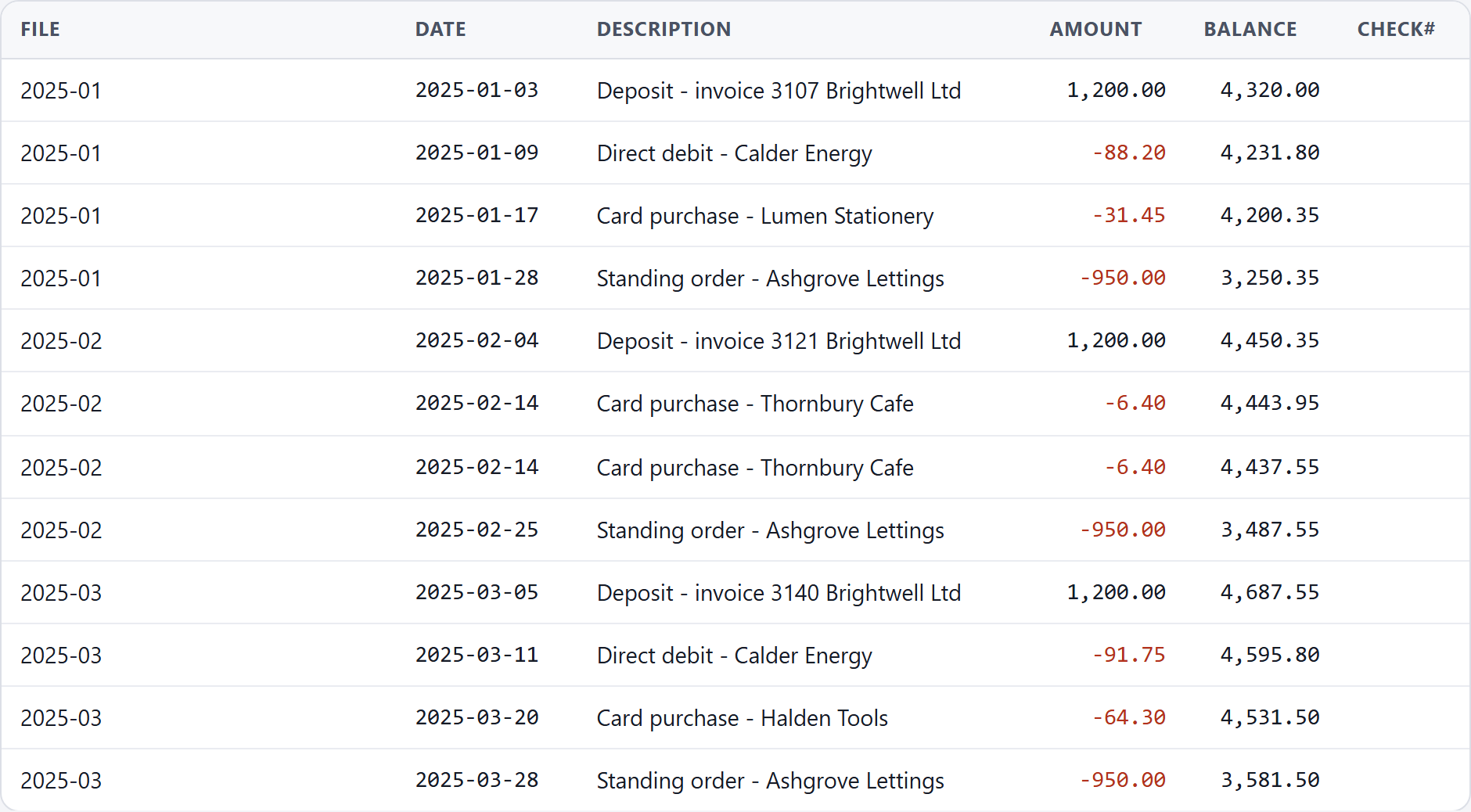
The proof is the PDF. A pair the bank printed twice in one statement is two real transactions — here the running balance steps down twice. A pair split across two files covering the same days, where each PDF prints it once, is one transaction seen twice, and step 2 will have shown the overlap. Delete one copy only then.
Check the year's total. Add every amount in the merged file. It should equal the last closing balance minus the first opening balance. For the three statements above: 3,581.50 − 3,120.00 = 461.50, and the twelve rows add up to 461.50. A difference equal to one transaction's amount points to a duplicate kept, a real row deleted or an amount misread; check that row against the PDF. If your year ends between two statements, reconciling a statement that ends on Dec 29 shows the cut at 31 December.
Why automatic de-duplication is the wrong fix
A rule that removes rows matching on date, amount and description would have removed one of the two coffees above, and the result would look tidy, with nothing to say anything had happened. February would be out by 6.40. Two taxis on a trip, a bill split in equal parts — each gives the same pair of rows. Marking candidates and deciding each against the PDF is slower, and nothing is deleted without your deciding.
LedgerDrop keeps rows in the order the files were given, and within each file in the order the statement printed them. It does not sort the merged file by date, and it does not remove anything.
Convert a statement → Free, no account, and the PDF stays in your browser. Twelve at once is LedgerDrop Pro, $39 once.
Keep the PDFs as well
The merged CSV is a working copy; the statements are the record. The IRS page on how long to keep records says “Keep records for 3 years if situations (4), (5), and (6) below do not apply to you”, “Keep records for 6 years if you do not report income that you should report, and it is more than 25% of the gross income shown on your return”, and “Keep records for 7 years if you file a claim for a loss from worthless securities or bad debt deduction”. Those are US federal rules. Banks do not keep statements online for ever either — how far back you can download bank transactions lists what several say.
What this will not do
LedgerDrop will not check that one statement follows another, and it will not find or remove duplicates. Steps 2 and 3 are by hand.
It will not add balances from different statements together; a combined file keeps each row's file name.
And it cannot settle the dates on a statement that runs over New Year without printing its years — why your converted bank CSV shows the wrong year explains where the year comes from and how to check it before you merge.
Questions
Should I sort the merged file by date?
Only if every file is from the same account, and after the checks above. LedgerDrop leaves rows in file order on purpose: two accounts interleaved by date give a running balance that belongs to neither.
Can LedgerDrop remove duplicates for me?
No, deliberately. A duplicate and two real payments of the same amount on the same day are identical rows; only the statements tell them apart. What it gives you is the column naming each row's file, which shows whether a pair came from one statement or two.
How long should I keep the statements after merging them?
In the US, the IRS says you “must keep your records that support an item of income, deduction or credit shown on your tax return until the period of limitations for that tax return runs out” — generally 3 years, 6 in the case of unreported income over 25% of the gross income shown, 7 for a claim for a loss from worthless securities or a bad debt deduction. Keep the PDFs, not only the CSV.
Next: how to check a converted bank statement CSV for errors, how far back you can download bank transactions, and why your converted bank CSV shows the wrong year.